


Download MacFonts – Free Unusual Fonts for Mac, Windows, and Design Tools
Overview
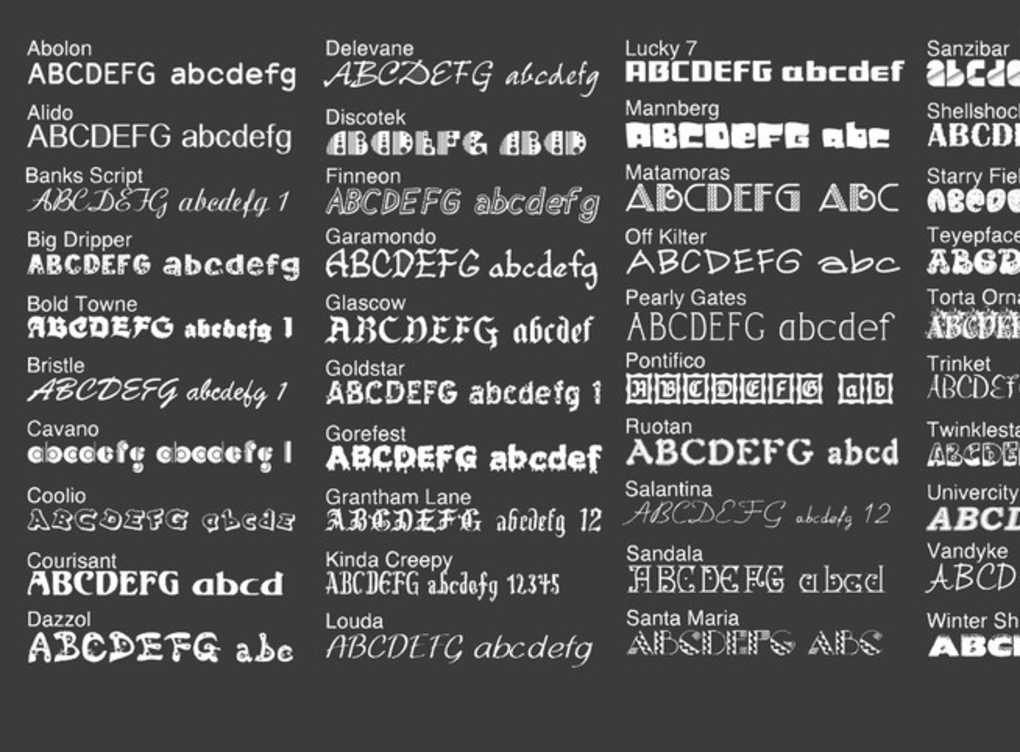
MacFonts is a curated collection of 40 free, unconventional typefaces that are licensed for commercial use. Built around the OpenType format, each font in the MacFonts bundle works seamlessly on macOS, Windows, and virtually any platform that supports OpenType, making it a versatile addition to your creative toolbox. Whether you are designing a branding campaign in Adobe Illustrator, polishing a presentation in Microsoft Office, or crafting a poster in Pixelmator, MacFonts offers a fresh visual language that stands out from the typical system fonts.
The collection is especially valuable for designers, marketers, and hobbyists who need eye‑catching typography without the hassle of licensing fees. Because the fonts are free and fully licensed for commercial projects, you can use them in client work, print collateral, websites, and even app interfaces without worrying about hidden costs. The download size is modest, and the installation process is straightforward—simply drag the font files onto your desktop or into the system font folder.
Once installed, the fonts appear instantly in any application that supports OpenType, from Photoshop and iWork to Adobe After Effects and iLife. MacFonts is more than a simple download; it’s a creative catalyst that encourages experimentation and helps you differentiate your visual output in a crowded digital landscape.
Key Features of MacFonts
- 40 Unique Typefaces – A hand‑picked mix of display, script, and experimental fonts that are not commonly found in default OS libraries.
- OpenType Compatibility – All fonts are delivered in the industry‑standard OpenType format, ensuring advanced typographic features such as ligatures, alternate glyphs, and kerning.
- Commercial‑Ready License – Each font is free for personal and commercial use, eliminating the need for additional licensing agreements.
- Cross‑Platform Support – Works on macOS, Windows, Linux, and any device that can read OpenType, making it ideal for mixed‑environment teams.
- Design‑Tool Integration – Fully compatible with Adobe Creative Cloud (Photoshop, Illustrator, InDesign), Apple iWork suite, Microsoft Office, Pixelmator, and most other graphic‑design applications.
- Lightweight Package – The total download is under 10 MB, which means quick download times and minimal storage impact.
- Easy Update Path – Future updates are provided as simple zip files; you can replace the existing fonts without reinstalling the entire suite.
- Free & Secure Download – Hosted on a reputable server with SSL encryption, guaranteeing a safe and virus‑free installation.
Installation & Usage Guide
Installing MacFonts is intentionally designed to be as frictionless as possible, catering to both novice users and seasoned designers. Follow these step‑by‑step instructions to get the fonts up and running on your machine:
- Download the Package: Click the “Download MacFonts” button on the official site. The file arrives as a compressed
.ziparchive. - Extract the Archive: On macOS, double‑click the zip file to automatically unzip it. Windows users can right‑click and select “Extract All…”. Inside you will find a folder named
MacFonts. - Access the Font Files: Right‑click the
MacFontsfolder (or Control‑click on a Mac) and choose “Show Package Contents”. Navigate to theFontssubfolder where the.otffiles reside. - Install on macOS: Drag the entire
Fontsfolder onto your desktop, then double‑click each.otffile. The Font Book app will open and prompt you to “Install Font”. Click “Install”. For batch installation, select all fonts, right‑click, and choose “Add to Font Book”. - Install on Windows: Open the
Fontsfolder, select all.otffiles, right‑click, and choose “Install”. Alternatively, copy the folder intoC:\Windows\Fontsfor system‑wide availability. - Verify Installation: Open any design application (e.g., Photoshop, Microsoft Word). In the font selector, type the name of a newly installed font to confirm it appears correctly.
- Usage Tips: Take advantage of OpenType features by enabling “Advanced Typography” in Adobe apps. This unlocks ligatures, stylistic sets, and alternate characters that can add personality to headlines and logos.
- Maintenance: When a new version of MacFonts is released, simply replace the old
.otffiles with the updated ones. No registry edits or additional software are required.
By following these steps, you can quickly integrate the entire MacFonts library into your workflow, allowing you to experiment with unconventional type while maintaining a smooth, uninterrupted design process.
Compatibility, Pros & Cons
MacFonts is engineered for universal compatibility. The OpenType format ensures flawless operation on macOS (10.10 and later), Windows 7/8/10/11, and Linux distributions that support fontconfig. Mobile designers will also find the fonts usable on iOS and Android when embedded within apps or exported as assets, thanks to OpenType’s cross‑platform nature. Integration with major creative suites—Adobe Creative Cloud, Apple iWork, Microsoft Office, Pixelmator, and even web‑based editors like Canva—is fully supported.
Pros
- Completely Free – No hidden fees, subscription, or registration required.
- Commercial License – Safe to use in client projects, merchandise, and marketing campaigns.
- Varied Style Palette – From quirky handwritten scripts to bold display letters, the collection covers many design moods.
- Lightweight & Fast – Small download size and minimal impact on system performance.
- Easy Updates – New versions are simple zip replacements, no complex installers.
- Secure Source – Hosted on an SSL‑protected server, reducing risk of malware.
Cons
- Limited Language Support – Primarily Latin characters; designers needing Cyrillic, Greek, or Asian glyphs will need supplemental fonts.
- No Dedicated Font Manager – Installation relies on OS font handling; a third‑party manager could streamline bulk activation.
- Static Collection – The set includes 40 fonts and does not expand automatically; users must wait for periodic releases.
Overall Rating: 4.5 / 5 – MacFonts delivers a robust, free typographic toolbox that meets the needs of most designers while maintaining professional licensing standards.
Frequently Asked Questions
Can I use MacFonts for commercial client projects?
Yes. Every font in the MacFonts collection is released under a commercial‑ready license, meaning you can incorporate them into logos, advertisements, product packaging, and any paid work without paying additional royalties.
Do the fonts support OpenType features like ligatures?
Absolutely. All MacFonts are true OpenType files, so advanced typographic features—ligatures, alternate characters, stylistic sets—are available in applications that expose OpenType controls (e.g., Adobe InDesign, Illustrator, Photoshop).
Are the fonts compatible with Windows 10?
Yes. The .otf format works natively on Windows 10 and later. After installing the fonts through the standard “Install” option, they appear in the Windows font picker and can be used in Microsoft Office, Photoshop, and other Windows‑based design tools.
How do I update the MacFonts collection when a new version is released?
The developer publishes a new zip file on the same download page. Simply download the updated archive, extract it, and replace the old .otf files in your system’s font folder. No re‑registration or additional software is required.
Can I use MacFonts in web design?
Yes, but you must embed the fonts using @font-face in your CSS. Because the fonts are OpenType, they can be converted to web‑friendly formats (WOFF/WOFF2) using free tools, then hosted on your server or a CDN for optimal performance.
Conclusion & Call to Action
MacFonts stands out as a rare gem in the crowded world of free typography. By offering 40 distinct, commercial‑ready typefaces in a lightweight OpenType package, it empowers designers, marketers, and hobbyists to experiment without financial risk. The straightforward installation process, broad compatibility across operating systems and creative applications, and the inclusion of advanced OpenType features make it a practical addition to any design workflow. While the collection lacks extensive language support and a built‑in font manager, these minor drawbacks are far outweighed by the value of having a ready‑to‑use, legally safe font library at zero cost.
Ready to give your projects a fresh visual voice? Download MacFonts now, install the fonts, and start creating standout designs today. Whether you’re polishing a client presentation, crafting a brand identity, or simply exploring typographic play, MacFonts provides the tools you need—free, secure, and instantly usable.







